- Product description
- Product Features
- Application Industry
- Product Case
-
- Commodity name: WEB Fingerprint Access control&Attendance Machine
- Commodity ID: FD-A3
Fingerprint Access Control
Fingerprint Access Control
Feature
Suitable for small to medium offices/ compounds/ institutions/ government
Additional Interface for RS485 Equipment: Mini Printer/ External LCD (4 Characters)
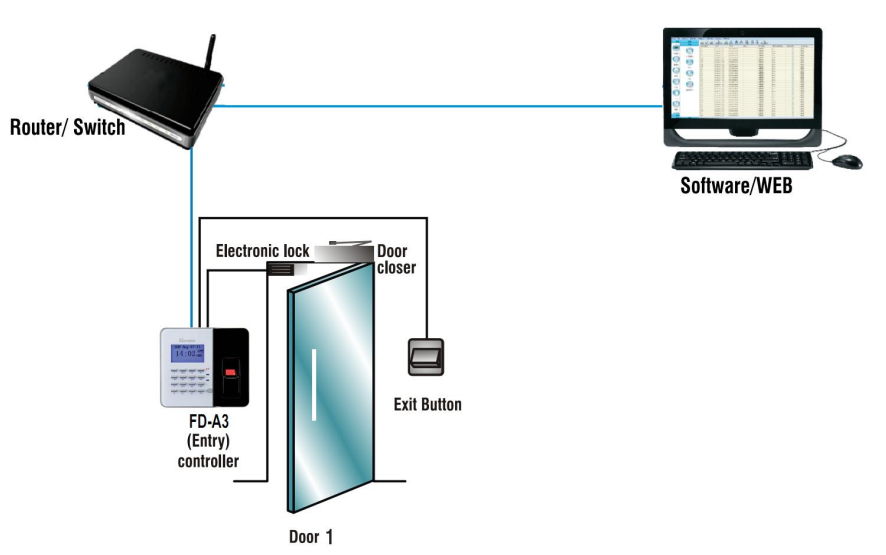
Relays to connect Exit Button/ Lock for door
Personal Bypass Verification instead Door Bypass Time Zone
Optional Fingerprint Templates: 1,000/ 3,000/ 9,000
Adjustable Still Open Delay Time
Faster Registry Function
Proprietary Access Control Software Provide
Real-Time Logs Query/ Download/ Export Reports (Web and Software)
Support Anti-Passback/ Multi-Badge Function
Adjustable Still Open Delay Time Setup for Different Door Locks
Selectable Bypass Verification: None/ Registered/ Company Code/ All
Easy to Enable Anti-Passback Function
Personal Bypass Timezone Verification mode
Selectable Verification modes: Door’s or Personal Bypass Time ZoneDatasheet
Verification Mode: FP/ Card/ Password Option: USB/Voice Software Application: PC Software System Log: 1,536 entries Template Capacity: 9590 Entry Log: 51,968 entries Sensor Type: Optical Time Zone/ Time Set/ Group: 255/120/255
SetsResolution: 500dpi Holiday/ Rin Setting: Yes/ Yes Sensing Area: 16x19mm Remote Control/ Event Handle: Yes/ Yes Template Size: 256~384 Bytes Multiple Badge/ Fast Registy: 10 Groups/Yes Image Size: 272 x 320 (pixel) Function Key: 400 (Auto/ Manual) 1:1 Verification Time: <600msec Anti-Pass Back/ Anti Duress: Yes/ Yes 1:1000 Identification time: <760msec Power Consumption: 780mA±5% Card Capacity: 20,000 Power Requirement: 9~24VDC/ 1A Communications: TCP/IP, Wiegand/ RS485 Operation Temperature: 0~65℃ DIO Support: DI:3/ DO:2 Operation Humidity: 5%~80%, RH Inbuilt Relays (Max power requirement): Lock/ Ring (0.5A, 120VAC/ 1A, 30VDC) Dimension/ Weight: 160.2*140.2*46.7mm/501g Structure
Frequently Asked Questions
电源适配器在使用过程中发出嗡嗡、吱吱等异常响声
内部元件松动,此时需要专业人员打开适配器外壳并检查内部元件的固定情况。
电源适配器在使用过程中变得过热
1.检查是否连接了过多的设备或设备功率过大,超过适配器的额定功率,可减少连接设备数量或更换更大功率的适配器。
2.清理适配器的散热系统,如散热片是否被灰尘堵塞,风扇是否正常运转
3.可能是适配器内部电路存在短路故障,需专业人员检查并修复。
设备连接电源适配器后,充电速度极慢或无法充电
1.检查适配器的输出电压和电流是否稳定,如不稳定可能是内部电路元件老化或性能下降,需送修或更换。
2.检查充电接口是否松动、接触不良,如有问题可重新插拔或清理接口处的金属触点。
3.可能是设备的电池管理系统出现故障,可尝试重启设备或连接其他正常电源适配器进行测试。
Recommend
Product Message